Maintenance: the maintenance board
Purpose
The board shows every open maintenance job you can see, in one column per status, so you can tell at a glance what is waiting to be looked at, what is booked, what is under way and what needs checking. It is where most maintenance work starts.
Before you start
- You have maintenance access. If Maintenance isn't in your menu, ask your area support manager.
- You only see the nurseries you look after. Group-wide users see every nursery and group-wide jobs.
Open the board
-
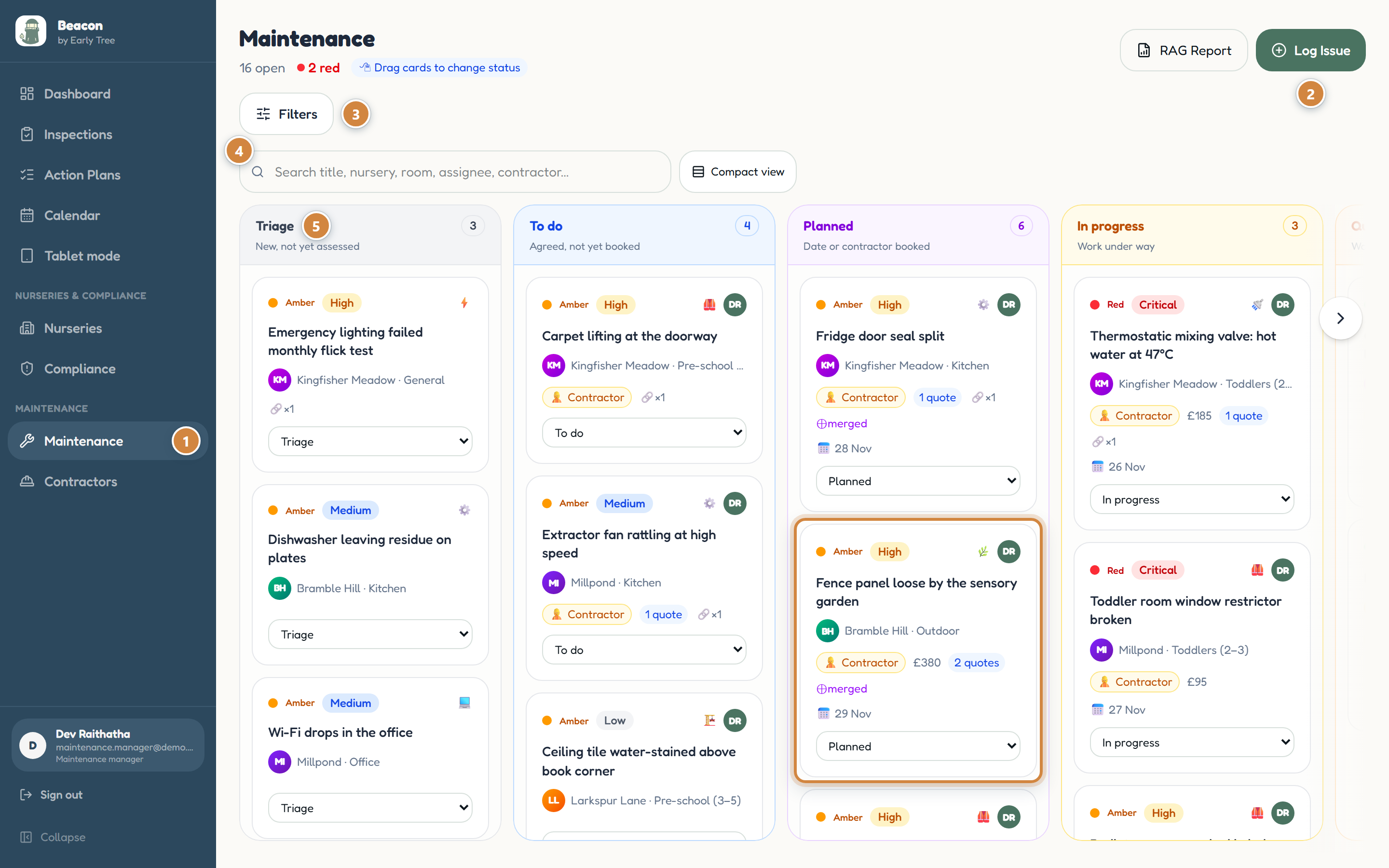
In the menu, select Maintenance 1. The board opens with every open job you can see.
-
Read the line under the heading: how many jobs are open, and how many are red. If you can move jobs, it also says Drag cards to change status.
-
To report a new job, select Log Issue 2. See Logging a maintenance job.
-
To narrow the board, select Filters 3. In the Filter maintenance window:
- Nurseries: select one or more nurseries.
- Owner: choose people from Add an owner….
- Show completed tickets: completed jobs are hidden until you tick this.
- Category: select one or more categories, such as Plumbing or Safety.
- Planned date: jobs whose planned date falls in the range.
- Contractor on site: jobs whose estimated start and end dates overlap the range.
Close the window when you're done. Each filter you've set shows as a chip next to Filters; select a chip's cross to remove it, or Clear all to remove them all.
-
To find a job quickly, type in the search box 4. It matches the title, nursery, room, owner, contractor and category, and says how many jobs match.
-
Each column 5 is a status, with a count of the jobs in it and a one-line reminder of what it means (for example "New, not yet assessed"). A long column scrolls on its own. Scroll sideways, or select the arrow at the edge of the board, to see Quality check and Completed.
-
Select Compact view to show each card on fewer lines when the board is busy. Beacon remembers your choice on this device. Full view puts it back.
Read a card
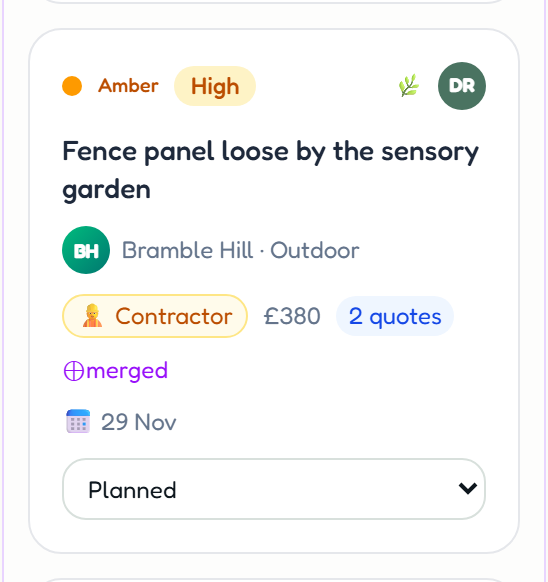
From the top, a card shows:
- the RAG colour (red, amber or green) and the priority (Low, Medium, High or Critical);
- a small category symbol, and the owner's initials (or a builder symbol if a contractor is needed but nobody owns it);
- the title, then the nursery and room;
- Contractor if the job needs an outside contractor, the estimated cost, the number of quotes (for example 2 quotes), a link symbol with a count if the job came from an inspection, and merged if duplicates were merged into it;
- the planned date;
- if you can move jobs, a status list you can use instead of dragging.
Open a job
Select a card to open the job's own page, with its details, quotes, status buttons and history. See A job's page: details, owner and comments.
What you should see
The board shows only the jobs that match your filters and search, with each column's count updated. The filters are part of the page address, so you can bookmark a filtered board or send the link to a colleague who can see the same nurseries.
Common problems
- Maintenance isn't in my menu, or it takes me back to the dashboard.
- Your maintenance access is None. Ask your area support manager to give you access.
- The board says "Read-only · You can add new items".
You have Contributor access: you can log jobs, but only someone with Manager access can move or change them. See Logging a maintenance job.
- A job I know about isn't on the board.
Check the filter chips and the search box, and tick Show completed tickets under Filters if it may have been finished. A job merged into another one no longer appears on its own.
- The open count here doesn't match the RAG report.
The board's count leaves out jobs in Quality check; the report counts them as open. Both are right for what they measure.
- I can't drag cards.
- Only people with Manager maintenance access can move jobs. On a touch screen, press and hold a card before dragging it.