Maintenance: quotes and cost estimates
Purpose
Keep the money side of each job in one place: what you expect it to cost, the quotes you've had, which one you accepted, and what it actually cost. The RAG report adds these up into spend and budget figures for the group.
Before you start
- You have Manager (full) maintenance access.
- Have each quote to hand: the supplier, the amount and their reference.
Estimate the cost with a cost model
When a job needs a contractor, tick Requires external contractor (when logging the job, or in Edit Details) and choose a Cost Model:
| Cost Model | How the estimate is worked out |
|---|---|
| Day Rate | Day rate (£) times Estimated days |
| Hourly | Hourly rate (£) times Estimated hours |
| SOW | The SOW value (£) agreed in a statement of work |
| Fixed Price | The Fixed price (£) quoted |
| TBD | No estimate yet |
Beacon shows the Estimated total as you type, and saves the contractor, the cost model and the figures with the job, with the total as its Est. cost. A cost model other than TBD needs a contractor. See Logging a maintenance job.
Record a quote
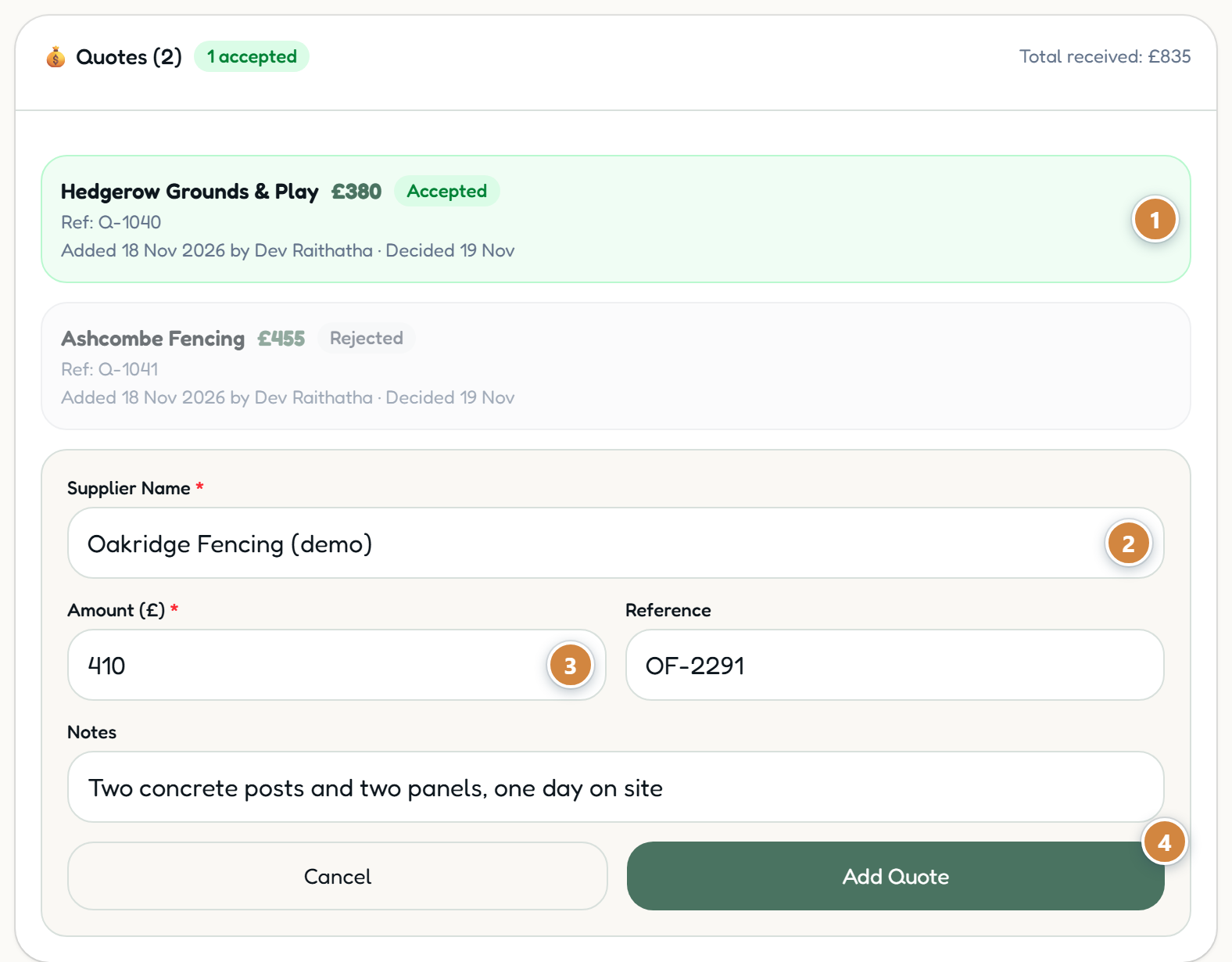
- Open the job's page from the board and scroll to Quotes. Any quotes already recorded are listed, with accepted ones in green 1.
- Select Add quote.
- Type the Supplier Name 2 and the Amount (£) 3. Both are required.
- Add the supplier's Reference (or your purchase order number) and any Notes, such as what's included.
- Select Add Quote 4.
- Repeat for each quote.
Accept or reject a quote
- On a quote that's still Pending, select Accept or Reject.
- Add a comment saying why, if it isn't obvious (for example "cheapest that can come this week").
If your organisation uses Nina, Compare with Nina appears once a job has two or more quotes. She compares them and posts her thoughts in the job's history; the decision is still yours.
What you should see
Beacon says Quote added, or Quote accepted or Quote rejected. The quote shows its status and the date it was decided, the card heading counts the accepted quotes, and Total received adds up every quote. Each quote and decision is recorded in the job's history. Accepted quotes for open jobs count towards Quoted (open) in the RAG report.
Record the actual cost
When the work is paid for, open Edit Details, type the Actual Cost (£) and select Save changes. The RAG report uses actual costs for its spend figures.
Common problems
- There's no Add quote, Accept or Reject.
- You need Manager (full) maintenance access.
- I accepted a quote, but the job's Est. cost didn't change.
Accepting a quote doesn't change the estimate. If the accepted price is different, update the cost model figures in Edit Details, or record the Actual Cost (£) when it's paid.
- I accepted the wrong quote.
A decided quote can't be changed back to pending. Add the right quote again, accept it, and explain in a comment.
- "Failed to save quote".
- Check the supplier name and amount are filled in, and the amount is a number of pounds, 0 or more.
- I'm a nursery manager and I can see Add quote, but saving fails.
- Recording and deciding quotes needs Manager (full) maintenance access. Send the quote to your maintenance manager.