Maintenance: merging duplicate jobs
Purpose
The same problem often gets reported twice: once from an inspection and once by the nursery, or by two members of staff. Merging keeps one job to track, with everything that pointed at either, so nobody books the work twice.
Before you start
- You have Manager (full) maintenance access.
- Decide which job to keep. Merge into the one with the most information (quotes, dates, owner, comments): the other one is archived.
- Check the two jobs really are the same problem. If you get it wrong, you can undo the merge (see Undo a merge).
Merge a duplicate into this job
- On the board, select the job you're keeping to open its page.
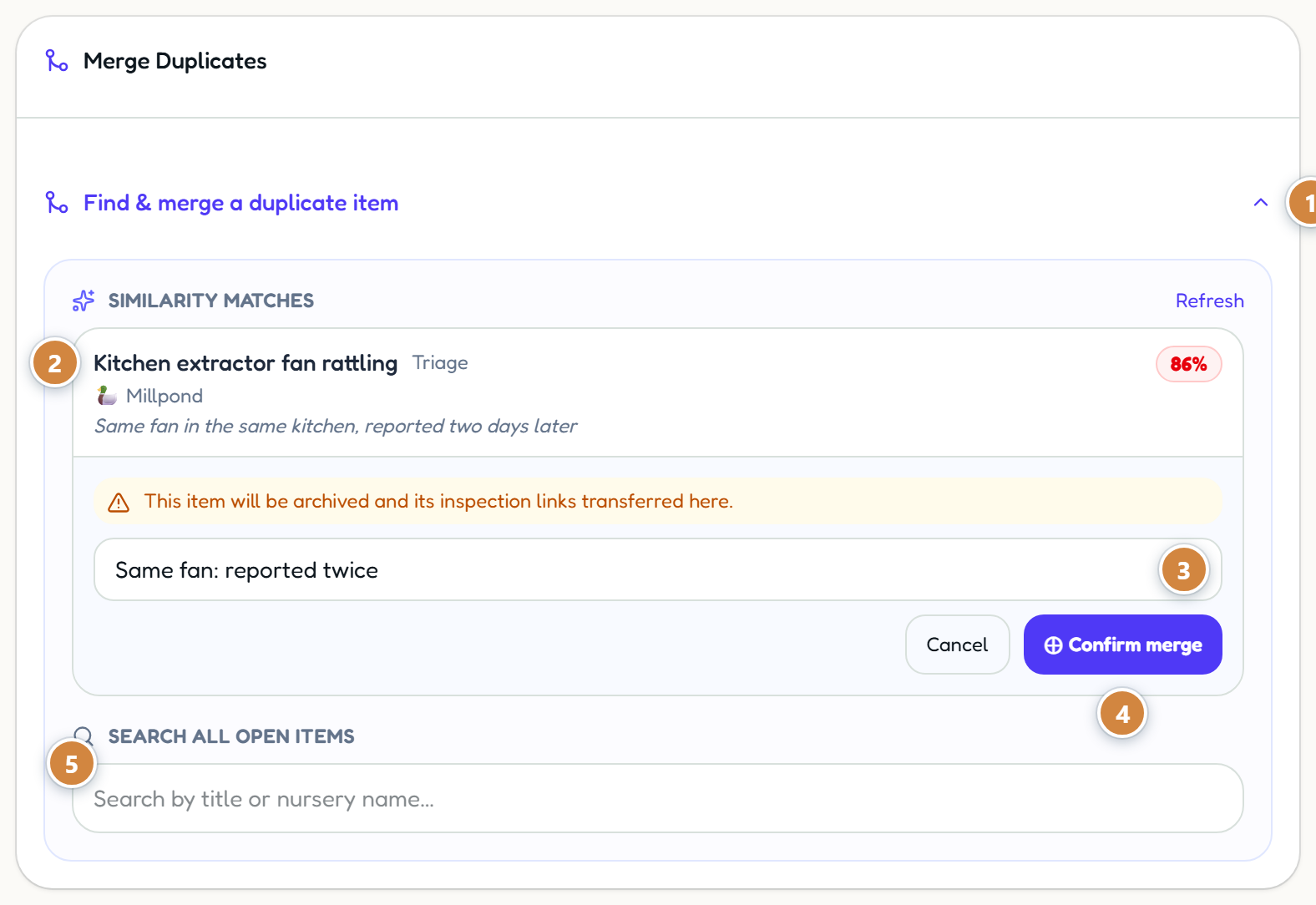
- Scroll to Merge Duplicates and select Find & merge a duplicate item 1.
- Beacon looks for likely duplicates and lists them, each with how closely it matches and why 2. If the one you want isn't there, search for it by title or nursery name under Search all open items 5.
- On the duplicate, select Merge →. Beacon warns: "This item will be archived and its inspection links transferred here."
- Add a Reason for merge 3 if it helps, for example "Same fan: reported twice".
- Select Confirm merge 4, or Cancel if you picked the wrong one.
What you should see
Beacon says the job was merged successfully. The duplicate disappears from the board, and the job you kept shows it under Previously absorbed, with a count of absorbed jobs and merged on its card. Both jobs' histories record the merge. Any inspections linked to the duplicate are now linked to the job you kept, and any action plan items it was tracking close when the job you kept is completed.
Undo a merge
On the job you kept, under Previously absorbed, select Undo next to the merged job, then Undo merge. It becomes a separate job again, with its own quotes and comments, and any inspections it brought with it are linked back to it. (For merges made before this option arrived, the inspection links stay on the job you kept.) Select a job's title under Previously absorbed to open it.
Merges and undos are recorded in both jobs' histories and in the audit log.
Common problems
- There's no Merge Duplicates card.
- You need Manager (full) maintenance access.
- "Source item is already merged".
- That duplicate has already been merged into another job. Open that job instead.
- The duplicate's quotes and comments aren't on the job I kept.
A merge moves inspection links, not quotes or comments. They're still on the merged job: select its title under Previously absorbed. Add any quotes you need again on the job you kept.
- I merged the wrong job.
- Undo the merge from Previously absorbed on the job you kept.