Inspections: planning an inspection
Purpose
Put an indicative date in for a nursery's next visit, so the visit shows on the calendar and the dashboard and the nursery knows when to expect you. A planned visit is only a reminder: nothing is inspected until you start it on the day.
Before you start
- You're an area support manager. Area support leads see the Plan Inspection button, but Beacon only saves a plan made by an area support manager (see Common problems).
- The nursery is set up and active in Beacon.
Plan a visit
- In the menu, select Inspections, then Plan Inspection at the top of the page.
- Choose the Nursery 1.
- Choose the Visit type 2: Monthly, Quarterly, Biannual, Annual or Ad-hoc. It decides which checklist items the visit will include when you start it (see About inspections).
- Choose the Scheduled date 3.
- If there's anything to remember for the visit, type it in Notes 4. Notes show on the planned visit for everyone who can see it.
- Select Schedule Inspection 5.
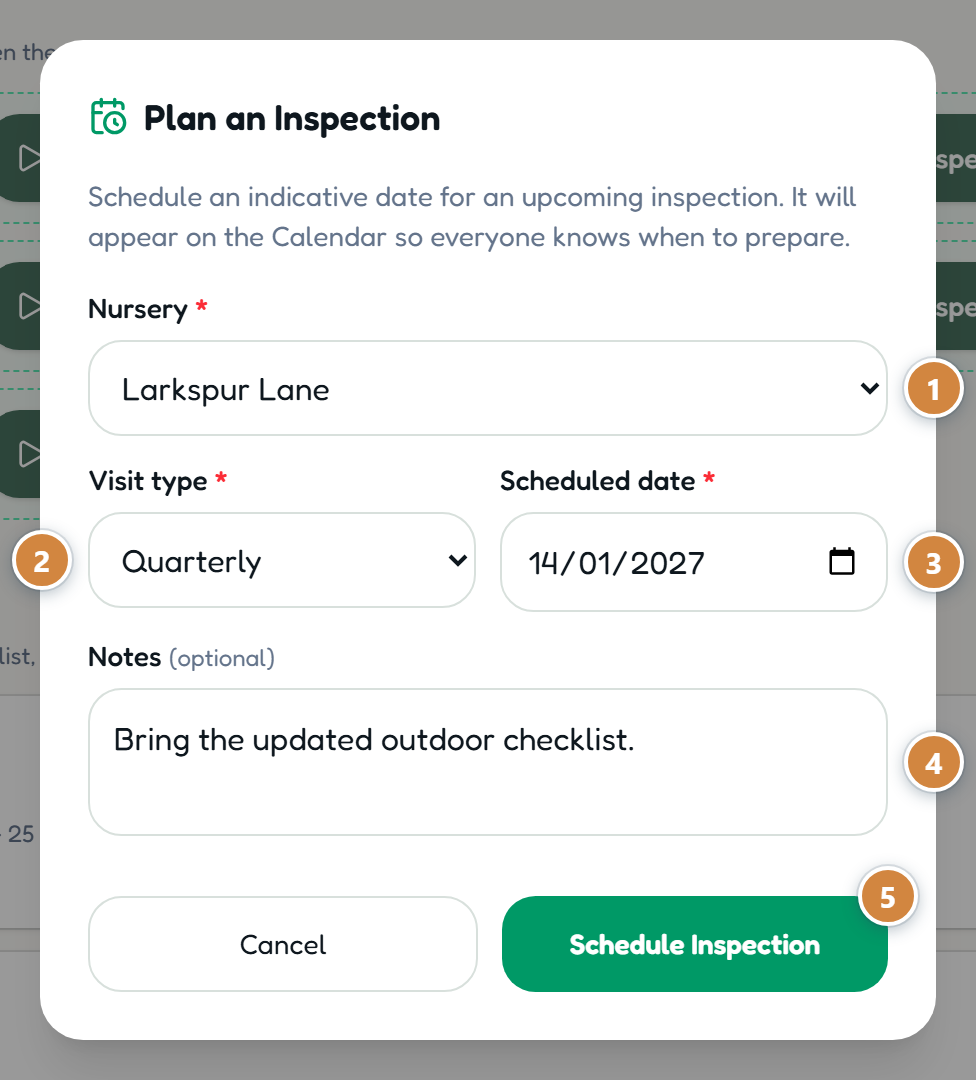
What you should see
Beacon shows Inspection scheduled and added to the Calendar. The visit appears in the Planned section of the Inspections page, on the calendar and in Planned inspections on the dashboard, with Start inspection next to it.
Start a planned visit
On the day, select Start inspection next to the planned visit, on the Inspections page or the dashboard. Beacon opens Start New Inspection with the nursery and visit type filled in. See Starting an inspection. Starting the inspection removes the planned visit, because the real one takes its place.
Change or remove a planned visit
A planned visit can't be edited. To move it to another date, remove it and plan it again.
- In the menu, select Calendar and find the planned visit.
- Select the bin (Delete planned inspection) on the visit. Only area support managers see it.
See Calendar for more about the calendar.
Common problems
- I'm an area support lead and I see "Area Support Manager role required".
Only area support managers can plan visits, although the button shows for leads too. Ask an area support manager to plan it, or start the inspection on the day.
- The nursery isn't in the list.
You can only plan visits for nurseries you have access to, and only active nurseries are listed. Ask your Beacon administrator.
- The planned visit disappeared from the Inspections page.
An inspection at the same nursery started within seven days of the planned date, so Beacon hides the plan there.