Review: the narrative
Purpose
Write the inspector's formal assessment of the visit: what you saw, the strengths, what needs to improve and your overall impression. It appears word for word in the signed report and its PDF, so the nursery and anyone they share it with will read it.
Before you start
- The inspection has been submitted and you're reviewing it.
- Have your notes from the visit to hand. The Notes button at the bottom right of the review page shows the inspection team's notes.
Write the narrative
- Open the inspection from the In Review section of the Inspections page. The review page opens on Narrative.
- Beacon has started the narrative for you with a short summary of the visit. Edit it in the editor 1: use the toolbar for headings, bold, lists and links. Select the arrows at the top right of the editor to write full screen.
- Select Ofsted 2025 writing guidance for a reminder of how to write each part.
- Keep an eye on the word count 2. You need at least 50 words to sign off, and the narrative can't be left as Beacon's automatic summary; a thorough narrative is usually 300 to 600.
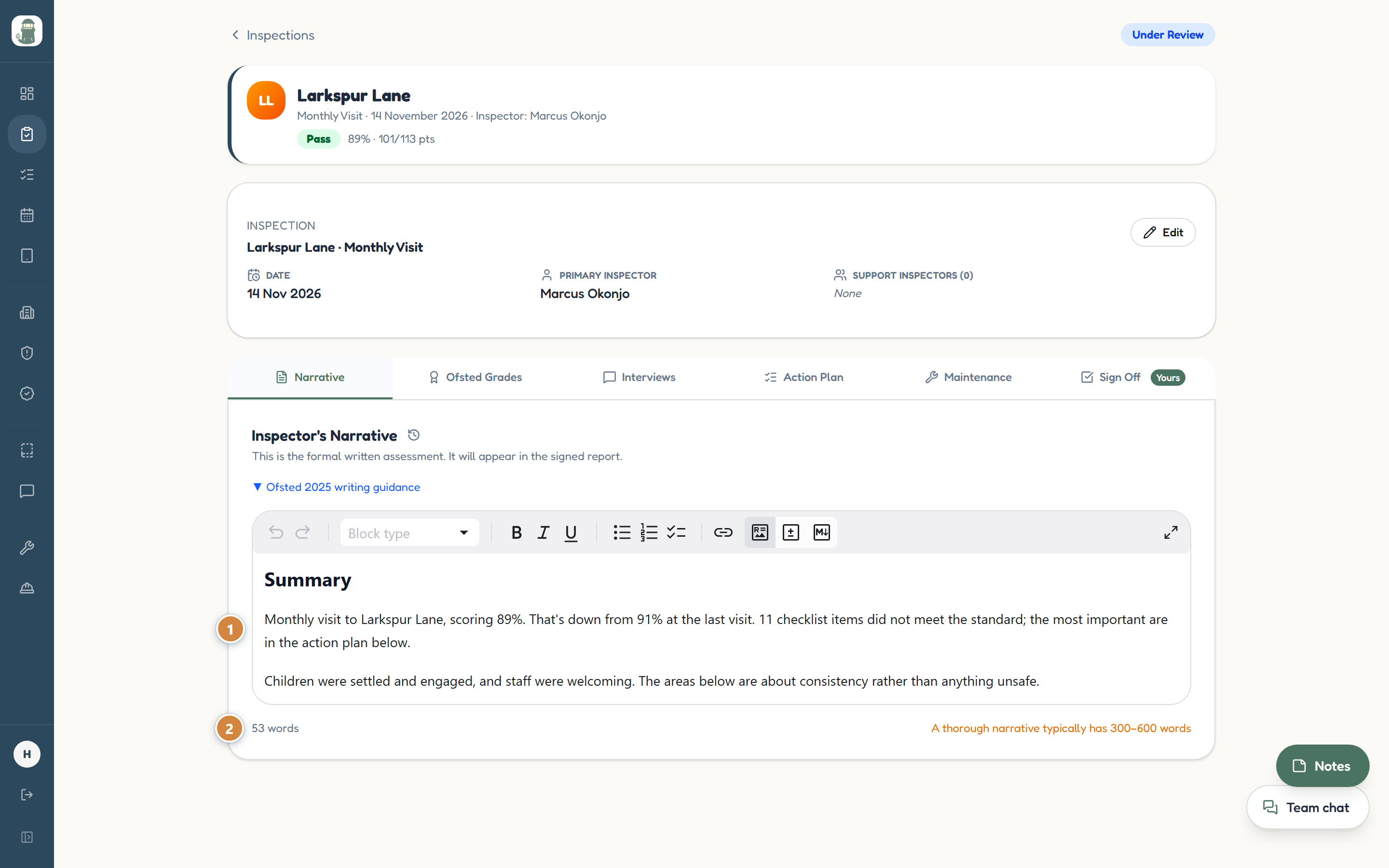
What you should see
Your changes save by themselves a moment after you stop typing: Saving… then Saved shows next to the heading. Select the clock next to Inspector's Narrative to see earlier versions and who changed them.
Ask Nina for a draft
If your organisation has Nina switched on, Ask Nina appears next to the heading, and she can draft or improve the narrative from the inspection's findings.
- If there's anything Nina should know that isn't in the checklist, such as a recent refurbishment or something the manager explained well, open Additional context for AI and type it there.
- Select Ask Nina.
- If the narrative already has text, choose Improve existing text to have Nina polish what's there, or Replace with Nina's draft to start again from her draft.
- Read every word of the draft and correct it. You're responsible for the narrative, not Nina.
See Nina for what Nina can and can't do.
Common problems
- The editor is greyed out and I can't type.
The report is locked: it has been signed off, or (for area support leads) it's awaiting manager approval.
- "Nina couldn't help just now — please try again".
- Nina isn't available, or isn't switched on for your organisation. Write the narrative yourself.
- "Failed to save narrative".
- Your connection dropped. Copy your text somewhere safe, refresh the page and paste it back in.