Review: grades and safeguarding
Purpose
Judge the nursery the way an inspector would, so leaders see where each setting stands before Ofsted visits:
- a grade for each of the six evaluation areas, with strengths and areas for improvement;
- the safeguarding judgement, which is separate from the grades: met or not met;
- your organisation's own internal quality grade.
These are internal judgements. They help you prepare; they aren't Ofsted judgements.
Before you start
- The inspection has been submitted and you're reviewing it.
- You've read the checklist results, notes and staff interviews.
Grade the evaluation areas
The six areas follow Ofsted's 2025 early years evaluation: Inclusion, Curriculum and Teaching, Achievement, Behaviour, Attitudes and Establishing Routines, Children's Welfare and Wellbeing and Leadership and Governance. Each is graded on a five-point scale: Exceptional, Strong Standard, Expected Standard, Needs Attention or Urgent Improvement.
- On the review page, select Ofsted Grades, then scroll to Evaluation Area Grades. It shows how many areas are graded, such as 6/6 graded.
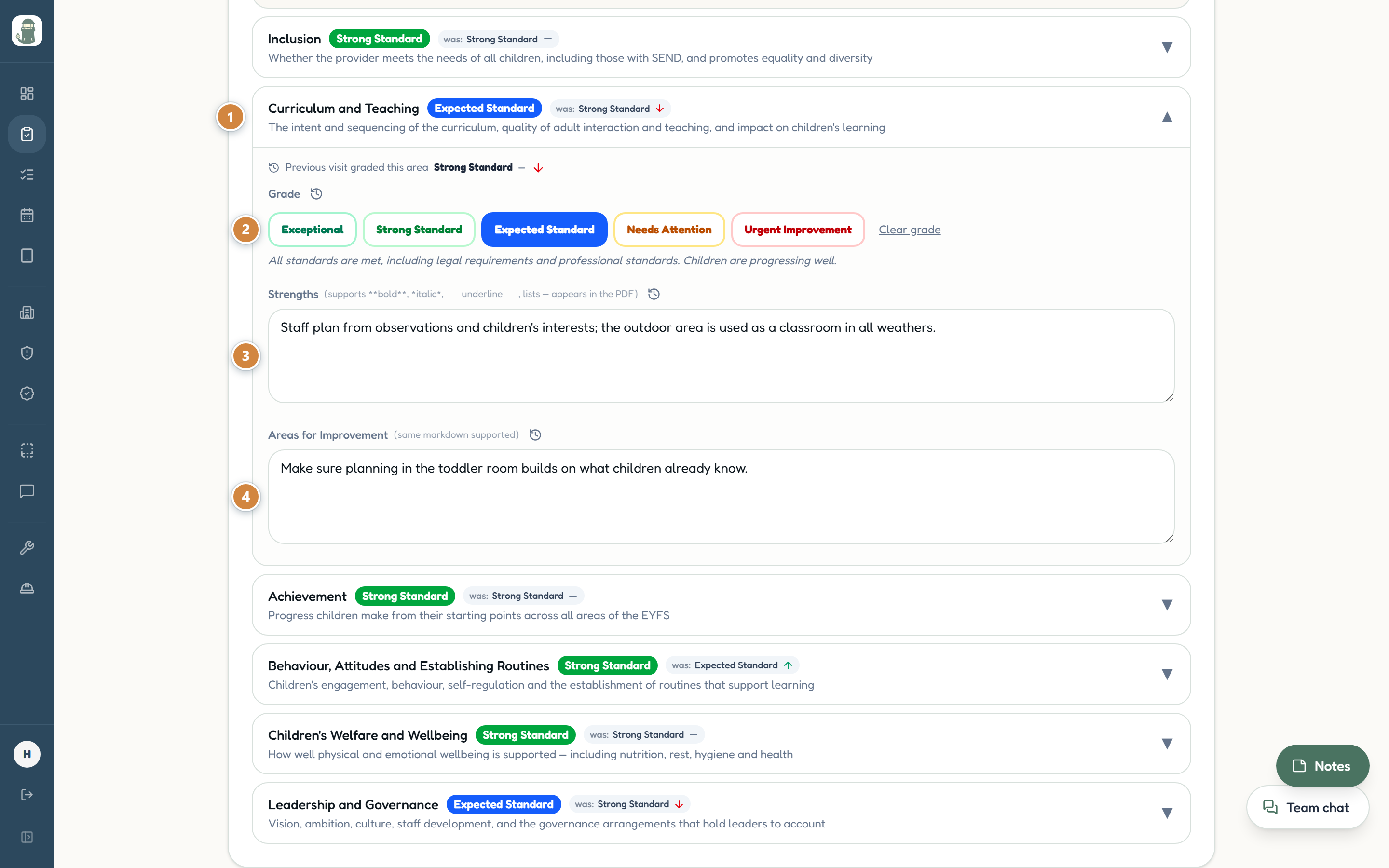
- Select an area 1 to open it. Previous visit graded this area shows last time's grade.
- Choose its grade 2. The description under the buttons explains the grade you've chosen.
- Under Strengths 3, write what the area does well, with the evidence you saw.
- Under Areas for Improvement 4, write what needs to improve and why.
- Repeat for each area. You need at least three areas graded to sign off; grade all six if you can.
If your organisation has Nina switched on, the Ask Nina button next to Evaluation Area Grades suggests a grade for every area from the checklist results, and fills them in. Check and change each one: a suggestion is a starting point, not a judgement.
Record the safeguarding judgement
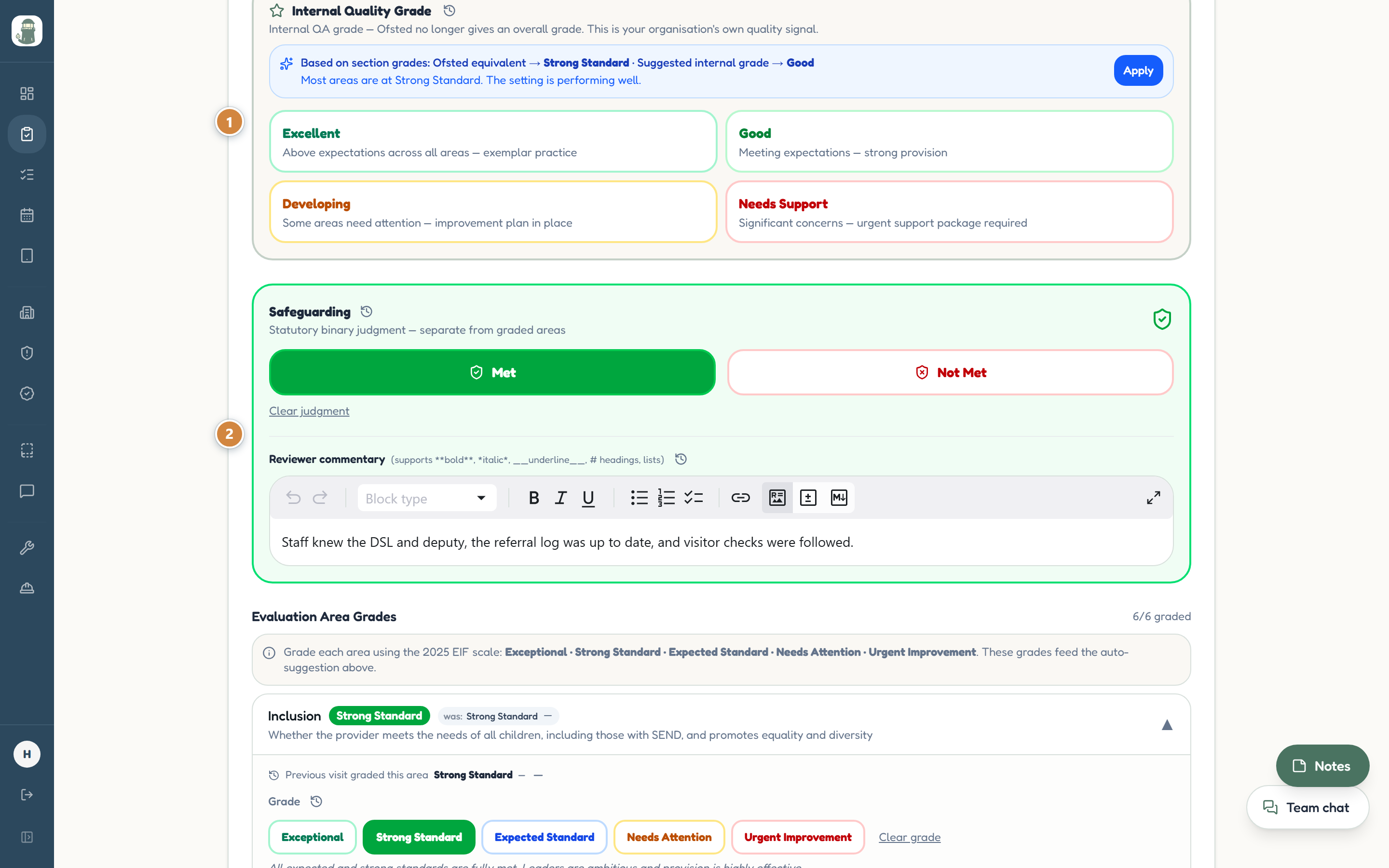
- In Safeguarding 2, select Met or Not Met. Select it again to clear it.
- In Reviewer commentary, explain the judgement: what you checked, the evidence you saw and any action taken or needed. It's printed in full in the report.
A Not Met safeguarding judgement needs escalating straight away. Beacon shows "A "Not Met" safeguarding judgment requires immediate escalation." Follow your organisation's safeguarding procedure now; don't wait for sign-off.
Set the internal quality grade
- In Internal Quality Grade 1, choose one of:
- Excellent: above expectations across all areas, exemplar practice.
- Good: meeting expectations, strong provision.
- Developing: some areas need attention, with an improvement plan in place.
- Needs Support: significant concerns, needing an urgent support package.
- Once some areas are graded, Beacon suggests a grade (Suggested internal grade) with its reasoning. Select Apply to use it, or choose your own.
What you should see
Each choice saves straight away, with a message such as Internal quality grade saved or Safeguarding judgment saved. If there was an earlier visit, Compared to the previous visit at the top shows how each grade has moved. The clock next to each heading shows the history of changes.
Common problems
- The buttons don't respond.
- The report is locked: signed off, or awaiting manager approval if you're an area support lead.
- "Failed to fetch suggestions — check inspection items are tagged with Ofsted areas."
- The checklist items aren't linked to evaluation areas, so there's nothing to base suggestions on. Grade the areas yourself.