Nurseries: self-assessment between visits
Purpose
Check honestly how ready your nursery is between visits. Beacon builds the questions from your own nursery: checklist items that keep failing, open actions, overdue compliance checks and expired staff certificates, plus the Ofsted areas and the basics of safeguarding. Only you and area support can see your answers.
Before you start
- You're the nursery manager for the nursery (or area support).
- Where your organisation uses Nina, open the nursery's page and select Self-assessment with Nina under Nina
insights. Without Nina there's no link to it in this release: open the nursery's page, then add
/self-checkto the end of the address in your browser's address bar.
Do a self-assessment
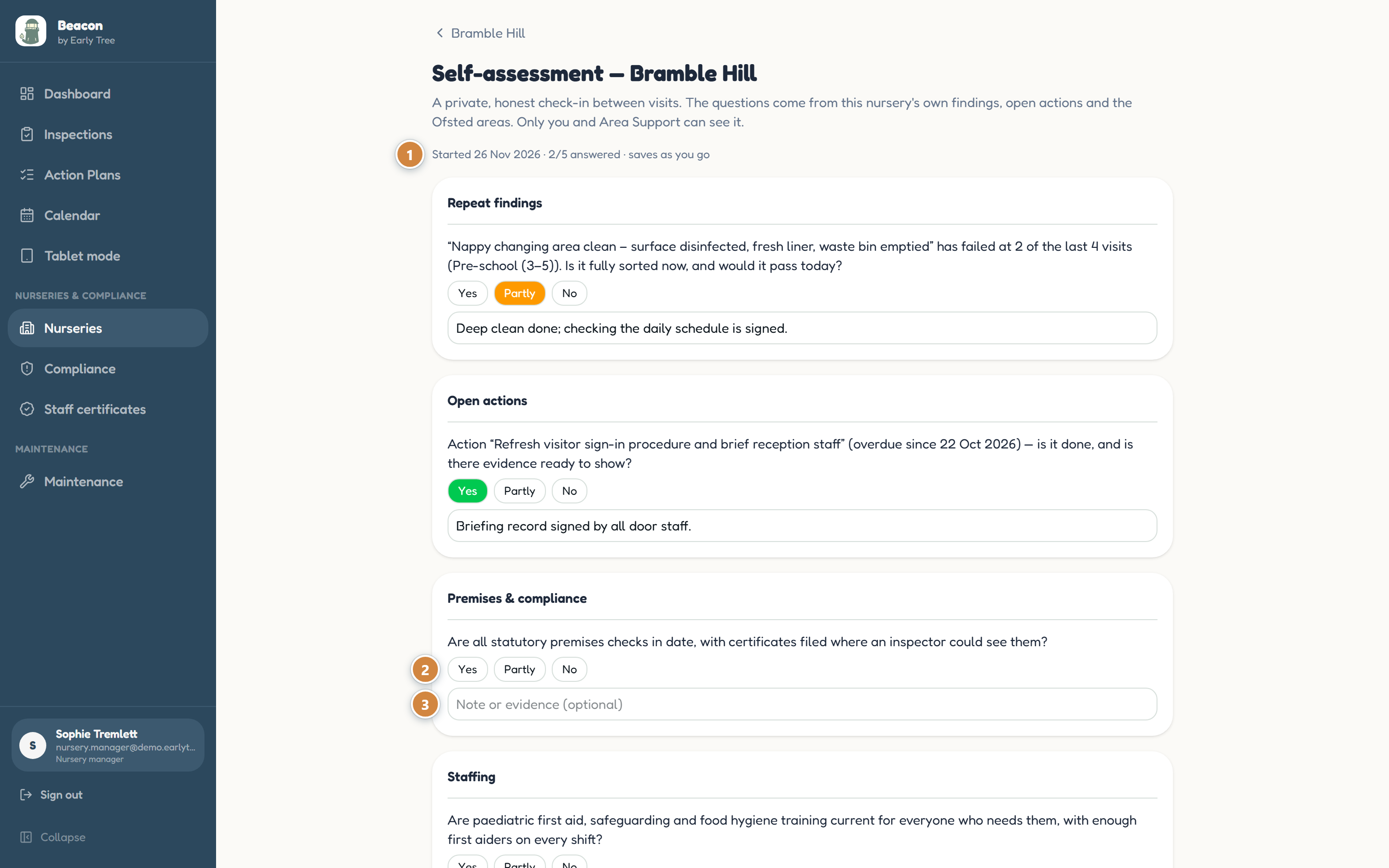
- Select Start a self-assessment (or Start a new self-assessment). Beacon prepares the questions, grouped into sections such as Repeat findings, Open actions, Premises & compliance, Staffing, Ofsted areas and Safeguarding.
- For each question, select Yes, Partly or No 2. Select your answer again to clear it.
- Add a note or the evidence you'd show an inspector in Note or evidence (optional) 3.
- Your answers save as you go: the line at the top 1 shows how many you've answered. You can leave and come back to it later.
Finish it
When you've answered what you can, select Finish self-assessment. Self-assessment saved appears.
Where your organisation uses Nina, the AI assistant, the button is Finish — ask Nina for my readiness summary instead: Nina writes a short readiness summary with your top priorities, labelled as AI-generated. Read it critically and use your own judgement. The latest summary shows on this page the next time you open it.
What you should see
Your answers are kept as you go. When you finish, the self-assessment is saved as complete (with Nina, a summary appears too), and you can start a new one at any time.
Common problems
- The page says it can't be found.
- Only the nursery's manager and area support can do its self-assessment.
- "Nina couldn't write the summary just now — try again shortly."
- Nina is switched on but unavailable. Your answers are saved; try Finish again later.
- "Couldn't save — check your connection".
- Your last answer didn't save. Check your connection and answer the question again.