Nurseries: areas and rooms
Purpose
An inspection goes round a nursery area by area. Each checklist item applies to a kind of area, and Beacon puts it on the checklist once for each area of that kind:
| Area type | What it's for | Checklist items that go there |
|---|---|---|
| General (Nursery-wide) | The nursery as a whole | Items that apply to the Nursery or the Group (for example DBS checks, fire exits) |
| Room | Each children's room | Items that apply to a Room (for example ratios, sleep checks) |
| Kitchen | The kitchen | Kitchen items (for example fridge temperatures) |
| Office | The office | Office items (for example the safeguarding referral log) |
| Outdoor | Outdoor areas | Outdoor items |
So the areas you set up decide what gets checked, and where. Changes apply to inspections started afterwards.
Before you start
- You're area support (a manager or lead) for the nursery, its nursery manager, or an admin. Nobody else sees the controls.
- Every nursery has a General (Nursery-wide) area at the top of the list. A new nursery also starts with Kitchen, Office and Outdoor; you add its rooms.
Add an area or room
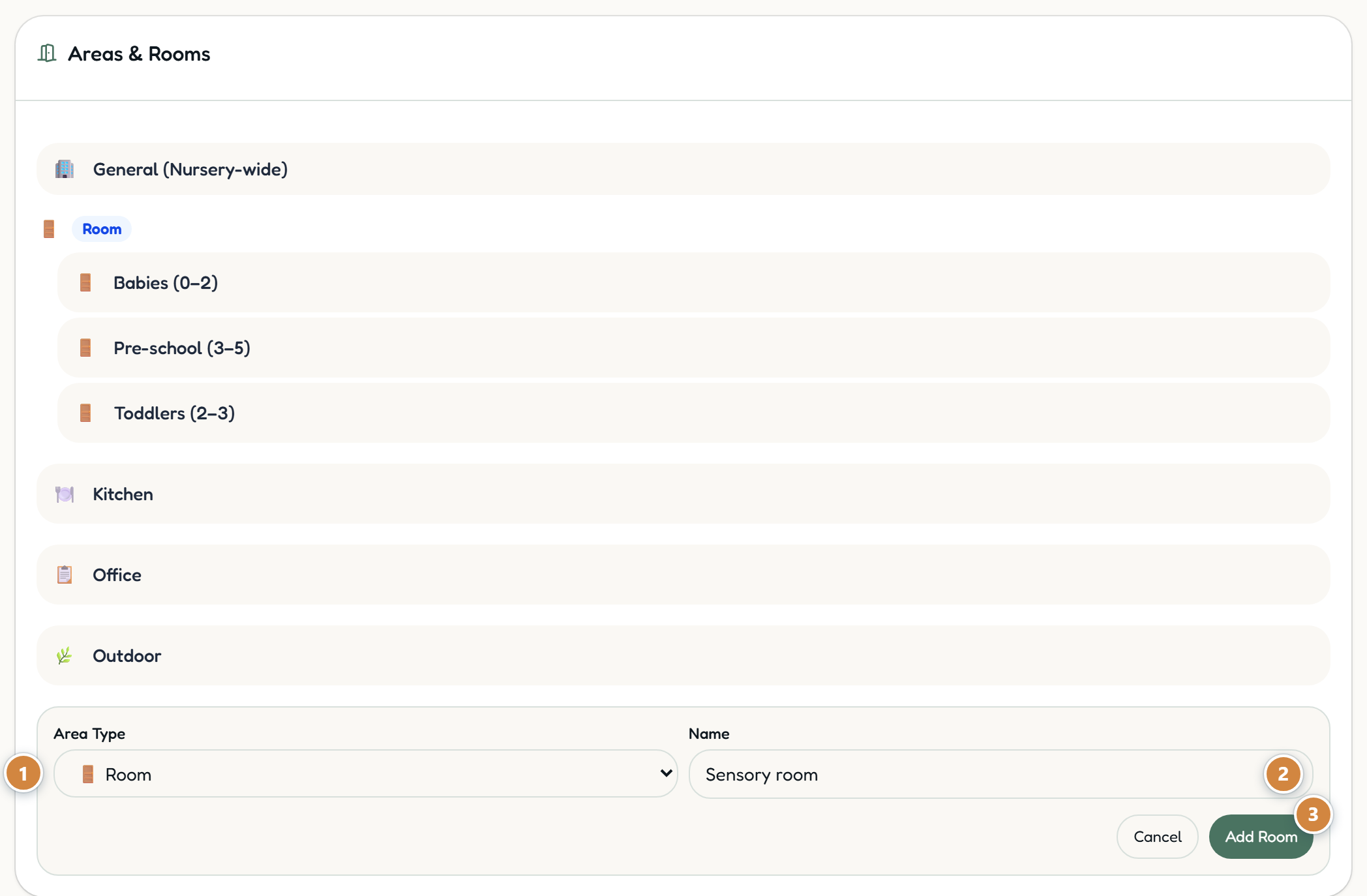
- Open the nursery's page and scroll down to Areas & Rooms. Areas are grouped by type, with the General (Nursery-wide) area first.
- Select Add area or room.
- Choose the Area Type 1: Room, Kitchen, Office or Outdoor.
- Type its Name 2, for example "Babies (0–2)".
- Select Add Room (or Add Kitchen, and so on) 3.
Rename or switch off an area
- Point at the area (or tap it on an iPad) and select the pencil that appears on the right.
- Change the name, or choose Inactive to stop it appearing on new inspections. Inactive areas stay on old inspections and reports.
- Select Save.
What you should see
The area appears under its type (or shows Inactive). The next inspection started at this nursery includes the checklist items for it.
Common problems
- The nursery doesn't have a Kitchen, Office or Outdoor area.
Nurseries added before these were created automatically only got the General area. Add the missing ones with Add area or room, or switch off one the nursery doesn't have.
- I can't find the pencil to rename an area.
- It only appears when you point at the area. The General area can't be renamed.
- I added a room but an inspection in progress doesn't show it.
- Rooms are fixed when an inspection starts. The room will be on the next one.