Nurseries: adding a nursery
Purpose
Add a nursery that's joining your group, so it can be inspected, have actions and maintenance jobs, and have staff assigned to it.
Before you start
- You're an admin or a group-wide area support manager.
- Have the nursery's name and full address ready, and the rooms it has.
Add the nursery
- Open the nurseries list (see Finding a nursery) and select Add Nursery.
- Type the nursery's Name 1.
- Under Animal Glyph (emoji) 2, type or paste one emoji for the nursery. It's required, but in this release Beacon shows the nursery's photo or initials instead.
- Type the full Address 3.
- Select Save 4.
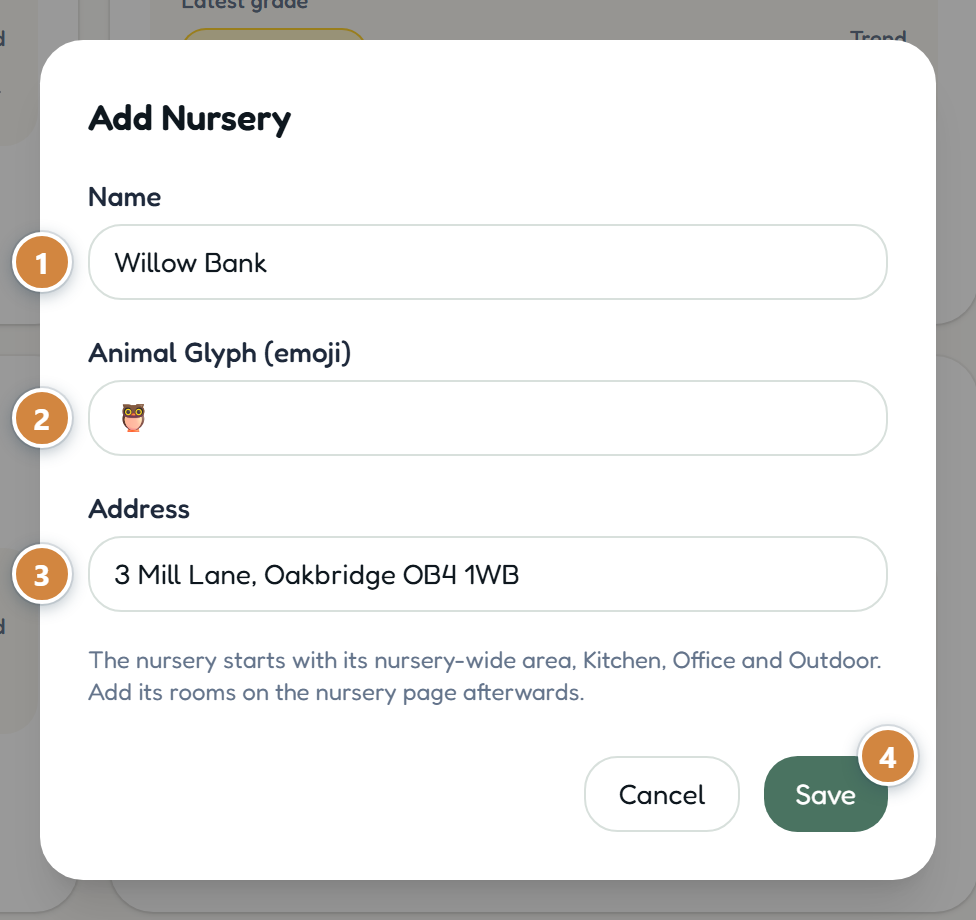
What you should see
The window closes and the nursery appears in the list. It starts with a General (Nursery-wide) area, so the nursery-wide checklist items (DBS checks, fire exits and most of safeguarding) are on its inspections, plus Kitchen, Office and Outdoor. Beacon gives it a site code made from the first two letters of its name (for example WI for Willow Bank), adding a number if another nursery already has that code.
Then finish setting it up
- Open the nursery and select Edit to check the site code, which starts every action's reference, and to add a photo. See Editing a nursery's details and photo.
- Add its rooms, and switch off any of Kitchen, Office or Outdoor it doesn't have. See Areas and rooms.
- Give the nursery manager and staff their roles at the nursery. See Administration.
Common problems
- I can't see Add Nursery.
- Only admins and group-wide area support managers can add nurseries.
- Save does nothing.
- All three boxes are required. Check you've filled in the emoji as well as the name and address.
- The site code isn't what we use.
- Change it straight away with Edit, before any inspections, so every action reference uses the right code.