Nurseries: site notes
Purpose
Record the lasting things everyone visiting or working on a nursery should know: preferred contractors, recurring issues, where the stopcock is, which gate sticks. Notes are shared with everyone who can see the nursery. Where your organisation uses Nina, the AI assistant, she reads them too, and notes she suggested are marked suggested by Nina.
Not for children or safeguarding
Never record anything about an individual child, a member of staff or a safeguarding matter in site notes. Use your nursery's safeguarding procedures for those.
Before you start
- You can see the nursery's page.
Add a note
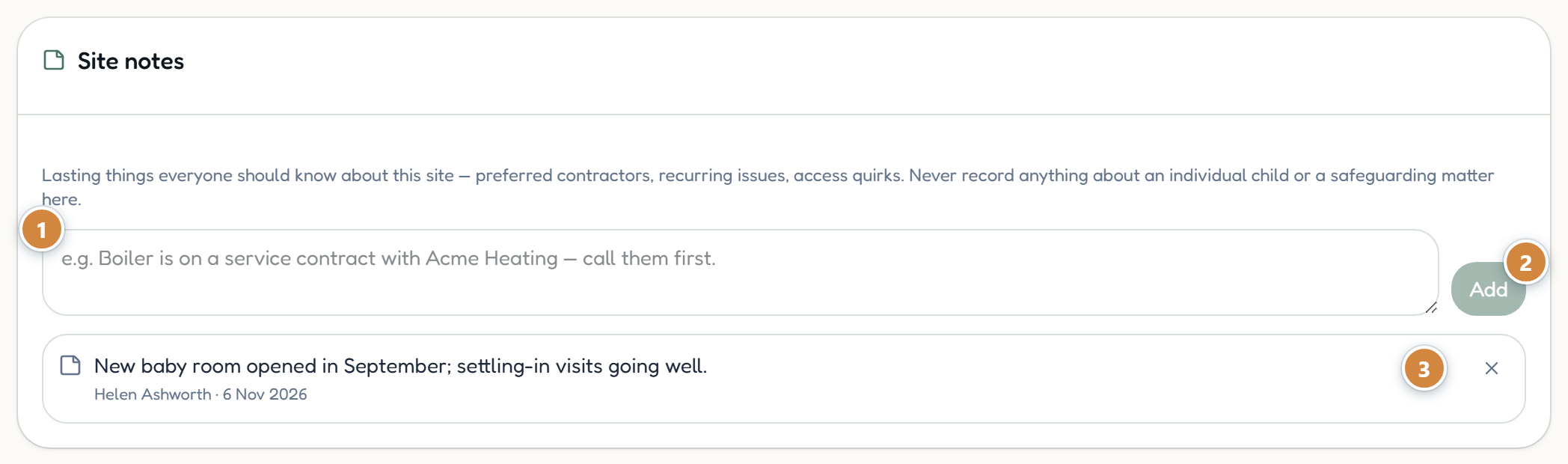
- Open the nursery's page and scroll to Site notes.
- Type the note in the box 1, up to 2,000 characters. For example: "Boiler is on a service contract; call the contractor first."
- Select Add 2.
Remove a note
When a note is out of date, select the cross next to it 3. It's removed straight away, for everyone.
What you should see
The note appears at the top of the list with your name and the date. Notes are newest first.
Common problems
- "Notes are limited to 2000 characters".
- Shorten the note, or split it into two.
- A note disappeared.
- Anyone who can see the nursery can remove a note. Removed notes are kept in Beacon's records but not shown.