Compliance: premises checks
Purpose
Keep every nursery's statutory and good-practice premises checks in date, with a record of who did each one and the certificate reference, so you can show an inspector or insurer at any time.
The checks and how often they're due:
| Check | Every | Statutory |
|---|---|---|
| Gas safety check | 12 months | Yes |
| Boiler service | 12 months | Good practice |
| Electrical installation condition report (EICR) | 60 months | Yes |
| Portable appliance testing (PAT) | 12 months | Good practice |
| Fire risk assessment review | 12 months | Yes |
| Fire alarm system service | 6 months | Yes |
| Emergency lighting annual test | 12 months | Yes |
| Fire extinguisher service | 12 months | Yes |
| Legionella risk assessment review | 24 months | Yes |
| Outdoor play equipment inspection | 12 months | Good practice |
| Asbestos management plan review | 12 months | Yes |
| Kitchen extraction clean | 12 months | Good practice |
These intervals are sensible defaults, not legal advice. Check the current requirement for your buildings with a competent person if you're unsure.
Before you start
- To record a check, you need to be an area support manager, the nursery's manager, or have maintenance access of Contributor or Manager.
- Have the date the check was done, who did it and the certificate or report reference.
Check a nursery's status
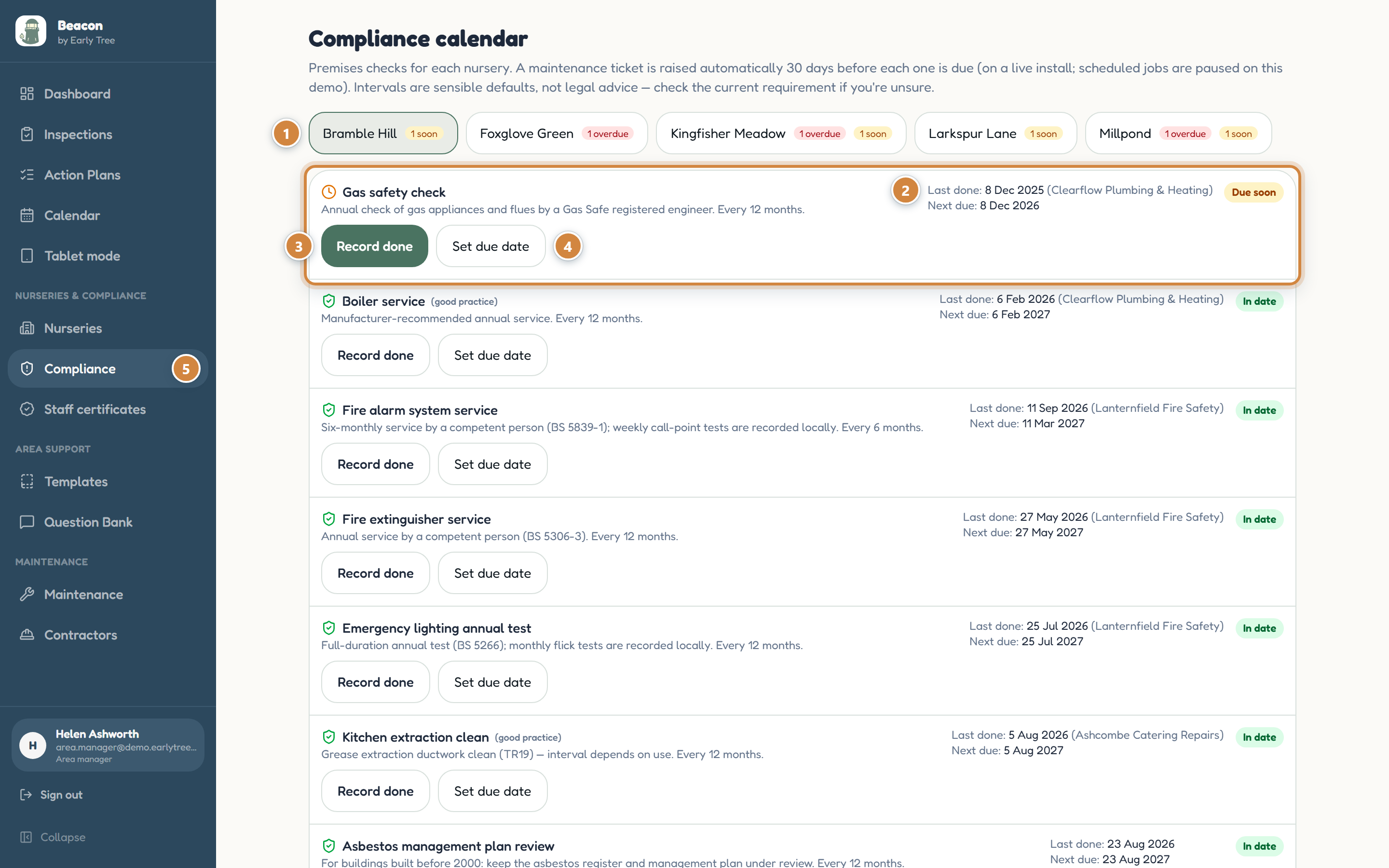
- In the menu, under Nurseries & compliance, select Compliance 5. Choose the nursery 1. Each nursery shows how many checks are overdue or due soon (within 30 days); not set up means none have been recorded yet.
- Each check shows what it is, how often it's due, Last done and Next due 2, and a status: In date, Due soon, Overdue or No date recorded. Good-practice checks are marked (good practice). The most urgent checks are at the top: overdue first, then due soon.
Record a check as done
- On the check, select Record done 3.
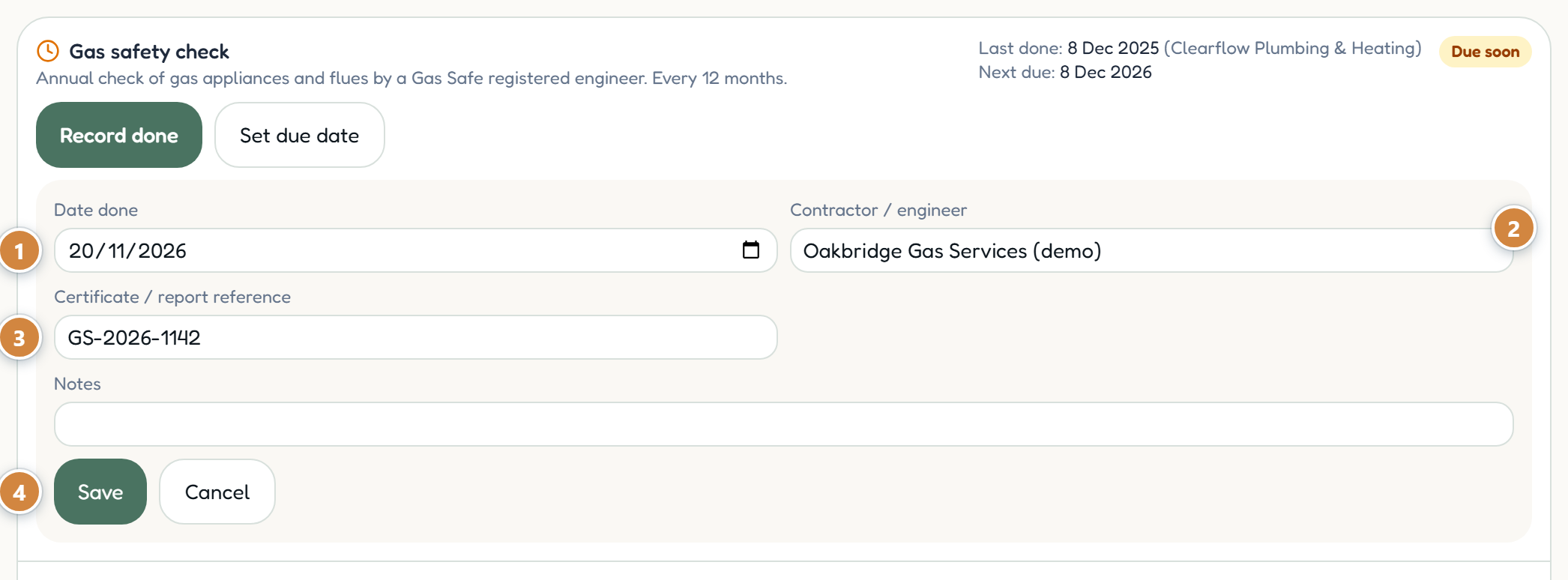
- Enter the Date done 1.
- Under Contractor / engineer 2, type who did it.
- Under Certificate / report reference 3, type the certificate number. Add any Notes.
- Select Save 4.
What you should see
Check recorded — next due date updated appears. Last done shows your date and contractor, and Next due moves on by the check's interval (for example 12 months). If a maintenance job was open for this check, Beacon adds a note to it that the check has been recorded.
Set a due date without recording a check
If a check has never been recorded in Beacon, or you know it's due on a particular date, select Set due date on the check (marked 4 on the first picture), choose the Next due date and select Save. Due date saved appears.
Maintenance jobs for checks
Every day, Beacon raises a maintenance job 30 days before each check is due. It goes into Triage (marked OVERDUE if the check is already late) so the maintenance team can book the contractor, and the check shows Reminder ticket while the job is open. This doesn't need Nina. When you record the check as done, the next job is raised 30 days before the new due date. See Maintenance.
On the public demo the daily jobs don't run, so no new reminder jobs appear there.
Common problems
- I can't see Record done or Set due date.
- You can look at the calendar but not change it. Ask your nursery manager or area support.
- Save is greyed out.
- Enter the date the check was done first.
- A check we don't need is listed (for example asbestos in a new building).
- Every nursery gets every check type. Use the notes to record why it doesn't apply, and set a due date far ahead.